
At Xylos, we still see plenty of IT teams leaning on VPN simply because it has always worked, even as the way people connect to their applications has moved well beyond what VPN was built for. In this piece, Jan Claes, Business Lead Azure and Senior Azure Cloud Architect at Xylos, takes a technical, in-depth look at why identity has replaced the network as the real security perimeter, and at what actually changes when you swap VPN for Microsoft Entra Private Access. It’s written for IT managers and architects who want the mechanics, not just the pitch.
REALITY CHECK
Compromised VPN credentials accounted for 48% of ransomware attacks in Q3 2025 (Beazley Security, via HIPAA Journal). Separately, Mandiant found that in roughly a third of the ransomware incidents it handled in 2025, initial access was the exploitation of vulnerabilities, most often in common VPNs and firewalls.
The way people work: anywhere, any device, any time, is exactly the way your perimeter was never designed to handle.
The problem: VPN was built for a world that no longer exists
The traditional model was a castle. Everything valuable lived inside the walls, servers, data, users at their desks. The firewall was the moat, the VPN was the drawbridge, and anything that made it across was trusted. That logic held because the things worth protecting really were inside the building.
Then the building emptied out. People now work from home, from airports, from a café, on an iPad, at whatever hour suits them, on devices you don’t always own. The perimeter didn’t get breached, it dissolved. And when your users and your data are no longer inside the walls, defending the walls protects nothing. The one thing that travels with every request, from any device and any location, is the user’s identity. That is why identity, not the network, is the perimeter now.
A VPN grants trust to the network. Zero Trust grants access to an application. That isn’t a semantic difference, it is a fundamentally different security model.
The mechanism: what your VPN actually does
A legacy VPN doesn’t shrink your castle to fit the new reality, it does the opposite. It extends “inside” out to every remote laptop. When a device dials in, it effectively becomes a node on your internal network, with a broad path straight to your infrastructure.
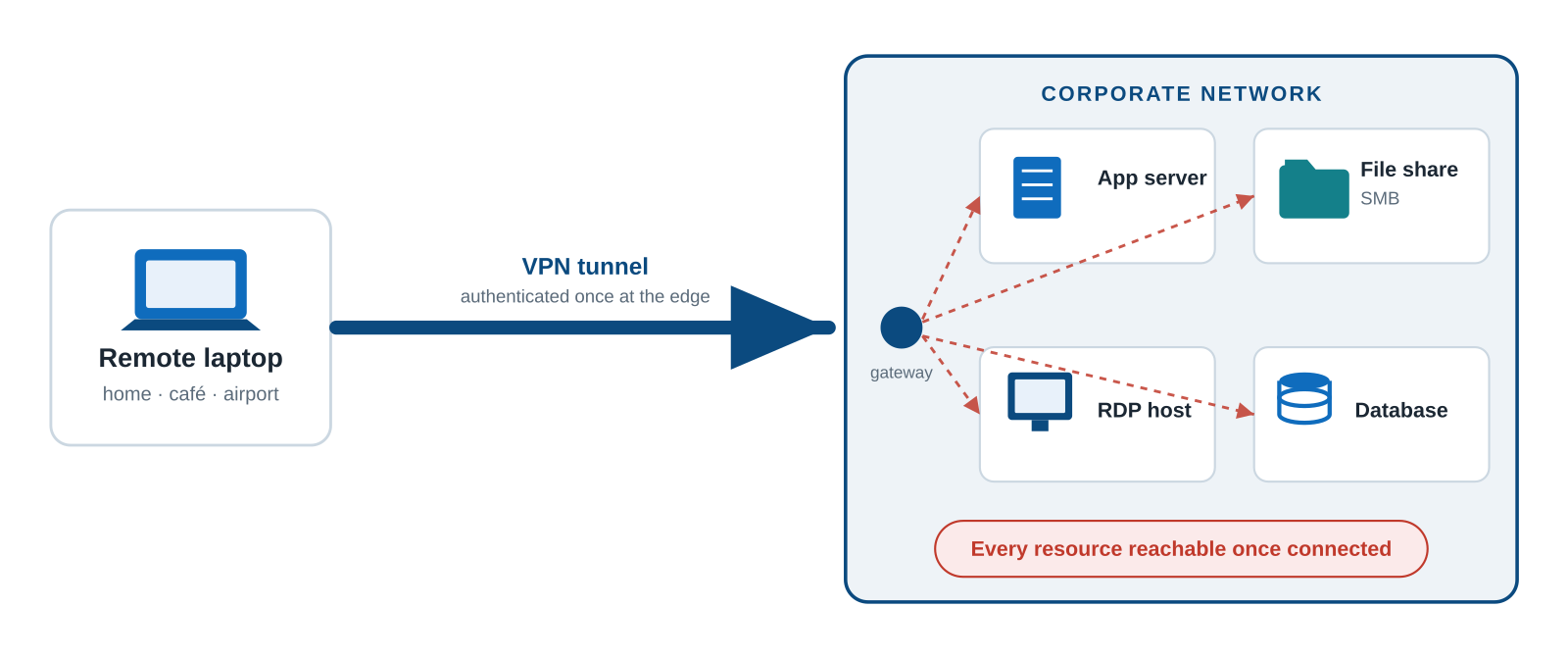
The consequences are structural, not incidental:
- Lateral movement. One phished credential or one compromised laptop, and the attacker doesn’t reach an app, they reach the network, then move sideways toward the next target.
- Ransomware’s highway. That same broad reachability is exactly how ransomware spreads from a single endpoint to file shares, servers and backups.
- No per-app control. The VPN authenticates you once, at the edge, then trusts you completely. It knows “this device is on the network” not which app you’re reaching, whether this user should, or whether the device is healthy.
- A target of its own. Internet-facing VPN and firewall appliances are among the most reliably exploited devices on the internet, with a steady stream of authentication-bypass CVEs across most major vendors.
Handing every remote laptop a VPN tunnel isn’t locking the door. It’s mailing a key to the whole building to anyone who logs in.
The reversal: published can be safer than hidden
Tell an IT manager to publish an app to the internet and they flinch, that sounds insecure. But put the two models side by side. A web app behind a VPN is protected by one check: did you get onto the network? After that, it trusts you. The same app published through Entra ID is protected on every single request: Single Sign-On with MFA, Conditional Access weighing the user, device, location and sign-in risk, a requirement that the device is managed and compliant, and phishing-resistant passkeys instead of passwords.
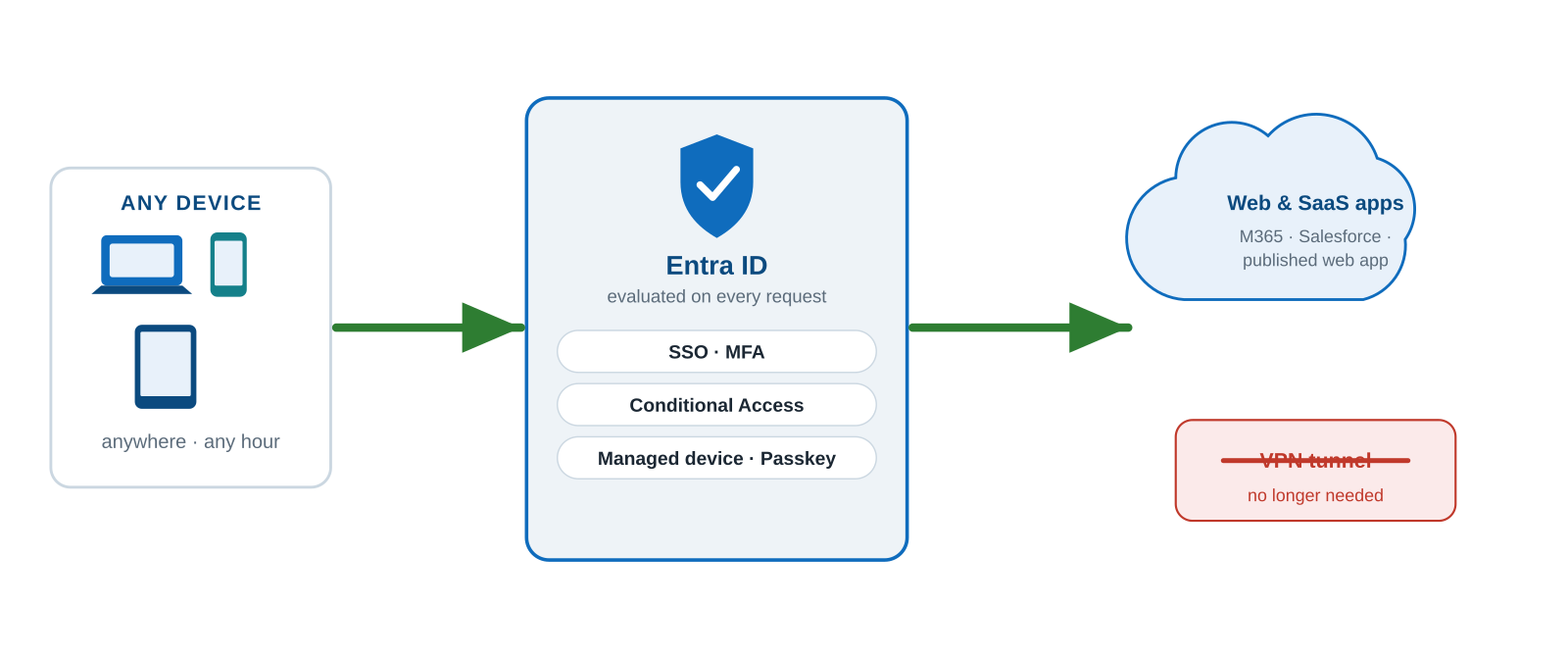
Properly published and identity-gated isn’t less secure than a VPN. It is meaningfully more secure.
| Legacy VPN | Identity-based access (Entra) |
|---|---|
| ✗ Broad network access once connected | ✓ Access per application, not per network |
| ✗ Trust based on being on the network | ✓ Verified on identity, device and risk, every request |
| ✗ No visibility into device health | ✓ Device compliance checked at each session |
| ✗ Inbound ports exposed to reach resources | ✓ Outbound-only connector; nothing inbound to attack |
| ✗ One breach = lateral movement | ✓ Blast radius contained to a single published app |
The solution: where Entra Private Access earns its keep
Web apps are the easy case. The real value shows up with everything you can’t simply publish: legacy client-server applications, SMB file shares, RDP, the old ERP that will never speak modern auth. This is exactly where a VPN feels unavoidable, and exactly where Microsoft Entra Private Access, the ZTNA component of the Global Secure Access (SSE) suite, replaces it properly.
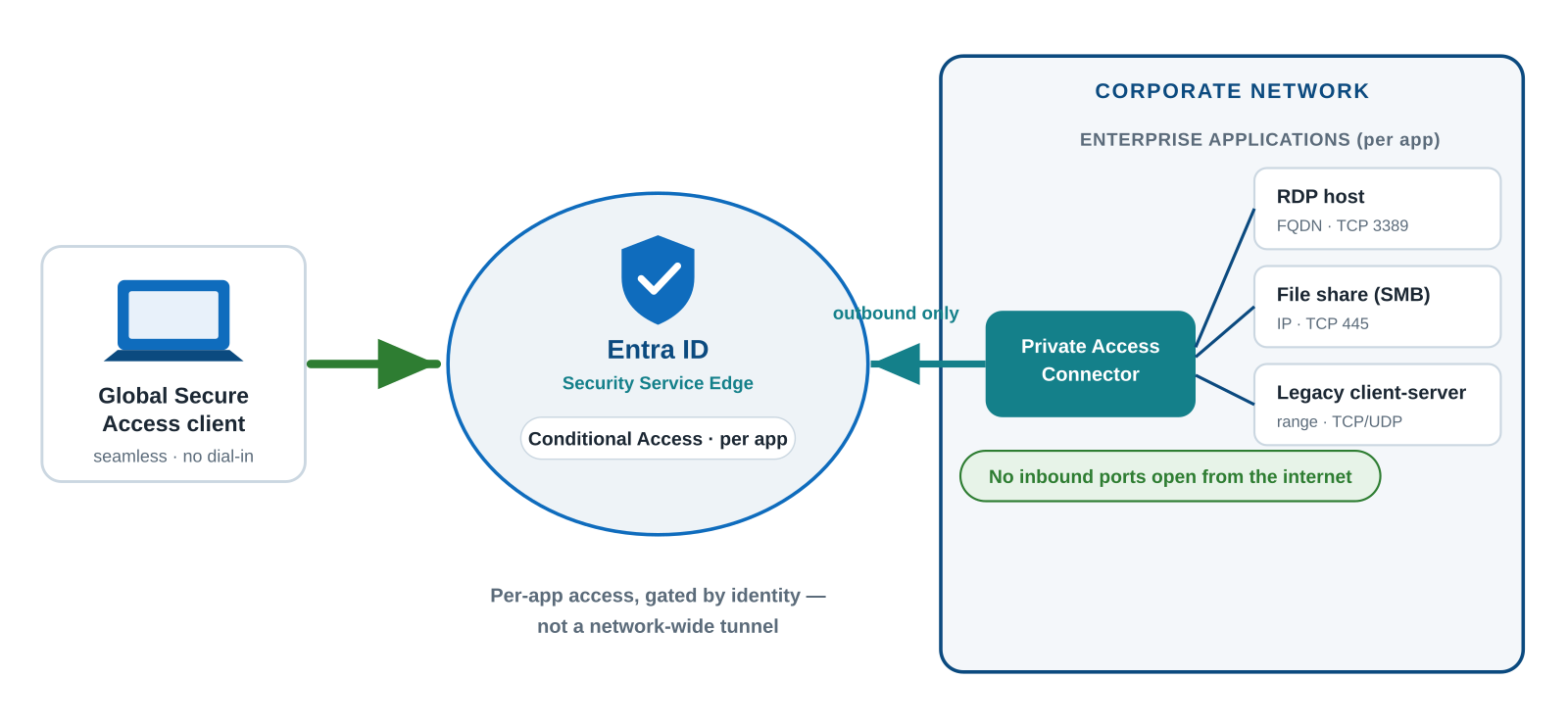
- No inbound ports. A lightweight connector inside your network makes only outbound connections to the service. You stop opening ports from the internet toward your servers or DMZ, there is nothing inbound left to attack.
- Per app, not per network. Each resource becomes its own enterprise application in Entra, with per-app Conditional Access tuned to its criticality, and per-app access for both TCP and UDP. Least privilege by design.
- Seamless for users. The Global Secure Access client runs quietly in the background: no dial-in, no “connect to VPN” ritual. The resource simply feels present, but access is brokered by a modern identity provider.
And you don’t have to boil the ocean. Start with Quick Access to replicate your VPN’s reach and get users off the old client, use Application Discovery to see what people actually touch, then carve those into per-app enterprise applications with their own Conditional Access. VPN out, Zero Trust in, one wave at a time.
The objection: “But other vendors do ZTNA too”
They do and it’s a fair point. Zero Trust Network Access is a mature category with capable, dedicated players: Zscaler Private Access, Palo Alto Prisma Access, Cloudflare Access and Netskope among them. Some are excellent, and for organisations with heavily multi-cloud estates or an existing investment in one of these platforms, they remain a legitimate choice. This isn’t an argument that Microsoft is the only way to do ZTNA.
It’s an argument about what you already own. If your organisation runs on Entra ID and Microsoft 365, and most do, then the identity layer, the policy engine and the admin experience for Zero Trust are already in your tenant. Entra Private Access isn’t a new platform to onboard; it’s a capability you enable:
- No new identity provider. Access decisions use the same Entra ID, the same users and groups, and the same Conditional Access policies you already run for Microsoft 365. A third-party ZTNA means integrating its policy model with your identity. One more system to keep in sync.
- No new console, no new team. It’s administered from the Entra admin center your team already lives in. Nothing extra to learn, staff or certify.
- One client, one agent. The Global Secure Access client is a single Microsoft agent, not another vendor’s software competing for the endpoint alongside your existing security stack.
- One contract. Licensing sits inside your Microsoft agreement. No separate procurement, no new renewal cycle, no extra support relationship.
Every additional vendor you introduce is another integration point, another attack surface, another invoice and another support queue. The most defensible architecture is usually the one with the fewest moving parts. And if you’re already a Microsoft shop, the fewest moving parts means using the identity platform you’ve already standardised on.
As a Microsoft partner, this is the pattern we see pay off: not “Microsoft because it’s Microsoft,” but Microsoft because the capability is already sitting in your tenant, waiting to be turned on.
The path: from VPN to Zero Trust in five steps
- Inventory the access landscape: Map which resources are reached over VPN, by whom, and how sensitive each is. You can’t secure what you can’t see.
- Make Entra ID + MFA the front door: Enforce MFA on every identity, including admins and service accounts, and switch off legacy authentication protocols.
- Deploy the GSA client with Quick Access: Replicate the VPN’s reach so you can validate connectivity and get users onto the new client without disruption.
- Segment into per-app applications: Use Application Discovery to turn broad access into individual enterprise apps, each scoped to the right users with its own Conditional Access.
- Decommission the VPN: Once the portfolio is migrated, retire the concentrator. The most exploited box on your perimeter simply stops existing.
WHAT YOU NEED AND WHAT IT COSTS
Prerequisite: Microsoft Entra ID P1 or P2. Note that Microsoft 365 E5 includes P2 but does not include Private Access, a common budgeting surprise.
Then choose one: a standalone Entra Private Access add-on (list price € 4,30 per user/month), or the full Entra Suite (€ 10,40 per user/month, annual commitment), which bundles Private Access with Internet Access, ID Governance, ID Protection and Verified ID.
List prices as budgeting anchors only, confirm current pricing for your region and agreement. Set against a legacy VPN’s licensing, appliance and operational costs, the economics usually favour consolidation.
The bottom line: identity is the new perimeter
Zero Trust isn’t a product you buy; it’s an architecture you adopt. Entra ID, Conditional Access and Global Secure Access make it operational without stitching together point solutions from a dozen vendors.
So the question for every IT manager isn’t “is our VPN working?” It’s a harder one: are we really secure in the way we deliver our applications to our users? Are we supporting how people actually work today: anywhere, any device, any hour.
Or defending a castle whose walls came down years ago? If that gave you pause, it’s worth a conversation.
Talk to Xylos
We help organisations retire legacy VPNs and move to identity-based access with Entra Private Access, from assessment through phased rollout.
